Page 1 of 2
Google Connect invalid request
Posted: Thu Nov 03, 2022 5:59 pm
by Baxder
I'm getting an Invalid Request error when signing in to Google via the Google Connect plugin.
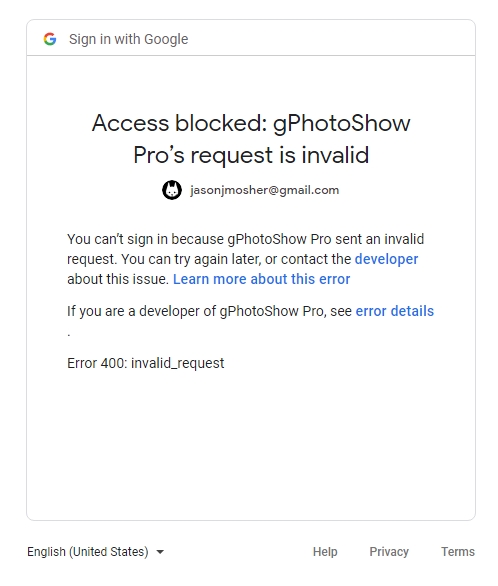
- 1.jpg (93.01 KiB) Viewed 10623 times
Super excited to have just discovered this feature - I've been pining for a replacement for the now defunct Chrome plugin that enabled the use of Google Photos as a screensaver!
Re: Google Connect invalid request
Posted: Thu Nov 03, 2022 6:06 pm
by gpb
Hello,
Did you install the last version of the plugin (1.3.3) ?
Older versions don't work any longer.
Which windows version and browser are you using ?
Re: Google Connect invalid request
Posted: Thu Nov 03, 2022 7:11 pm
by Baxder
I downloaded the package with the plugins included; it's version 1.3.2.
Getting the update now.
Thanks for the quick response!
Re: Google Connect invalid request
Posted: Thu Nov 03, 2022 7:23 pm
by Baxder
It connects fine now, but how do I get the images to display? I've selected the albums I want to use and created the temp folder C:\Program Files\gPhotoShowPro\Download, and nothing is happening.
Re: Google Connect invalid request
Posted: Thu Nov 03, 2022 7:26 pm
by Baxder
And I have another question regarding the plugin. The information page says that it "will randomly download the maximum number of pictures configured in the Settings window, when pictures are displayed by gPhotoShow they are deleted from the local folder and new pictures are downloaded from Google." Does it only delete/download new photos after they've all been displayed? Or does it delete them as they're shown and replace them 1:1?
Re: Google Connect invalid request
Posted: Thu Nov 03, 2022 8:17 pm
by Baxder
W10/Chrome, to answer your questions.
Re: Google Connect invalid request
Posted: Thu Nov 03, 2022 8:59 pm
by gpb
Baxder wrote: Thu Nov 03, 2022 7:11 pm
I downloaded the package with the plugins included; it's version 1.3.2.
Thanks, I will update the installer.
Baxder wrote: Thu Nov 03, 2022 7:23 pm
It connects fine now, but how do I get the images to display? I've selected the albums I want to use and created the temp folder C:\Program Files\gPhotoShowPro\Download, and nothing is happening.
It's not a good idea to download images in C:\Program Files\... usually it's not writable, admin rights are required
Create a folder inside Documents or directly on c:\ (for example c:\mypics) then set this folder inside the plugin and add the same folder to gPhotoShow Images list (Images page). Choose transitions and display time.
Baxder wrote: Thu Nov 03, 2022 7:26 pm
The information page says that it "will randomly download the maximum number of pictures configured in the Settings window, when pictures are displayed by gPhotoShow they are deleted from the local folder and new pictures are downloaded from Google." Does it only delete/download new photos after they've all been displayed? Or does it delete them as they're shown and replace them 1:1?
The plugin keeps a max number of images locally (default is 40 but you can change it), when this number is reached it starts to delete older pictures
On first run it may need some time before starting to display images
Re: Google Connect invalid request
Posted: Fri Nov 04, 2022 3:58 pm
by Baxder
Gotcha, thanks. I've changed the location to Pictures\Saved Files
So is it that the picture is downloaded, stored, and displayed all at once? Or does the program download a cache of [maximum] photos and display them from the local files? I'm asking because my work webs are garbage, so I'd prefer the cache method.
Re: Google Connect invalid request
Posted: Fri Nov 04, 2022 9:48 pm
by gpb
yes it works with a local cache with the max number of photos configured. GoogleConnect plugin works in background downloading pictures to the cache while gPhotoShow displays them from the cache.
Re: Google Connect invalid request
Posted: Sat Nov 05, 2022 2:39 am
by Baxder
I'm home now, and the plugin sticks on the "Waiting Authorization" dialogue until the progress bar fills after granting access in Chrome with no errors.