Something is wrong with the "Start gPhotoShow" and "Control Screen Saver" app. The former displays a white rectangle icon which loads an unopenable "scr" file. Its location in C:\Windows it's "gPhotoShow64.scr".
The latter has a reddish tv-lookalike icon which does nothing when I try to open it. In Program Files it is named as "ControlSS64.exe".
I've uninstalled and reinstalled gPhotoShow pro and still have the same problem.
Windows 11, up-to-date; Asus Zenbook 16s.
I use the screensaver which works automatically as it should after 5 minutes idle time.
Any ideas, folks?
Bug in app

Re: Bug in app
Hello,
the shortcut "Start gPhotoShow Screen Saver" is correctly linked to c.\windows\gPhotoShow64.scr
That file is the gPhotoShow Pro screen saver. Normally windows runs it since scr is a file extension for executable files just like exe
It is possible that your system's antivirus is preventing you from running a screen saver directly, or that the file associations are simply configured incorrectly.
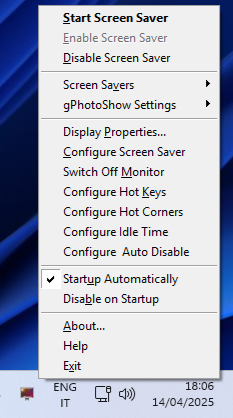
"Control Screen saver" (controlss64.exe) is small utility that has no main window, it has only a small icon in the windows system notification area:
Right click on it to see its context menu.
the shortcut "Start gPhotoShow Screen Saver" is correctly linked to c.\windows\gPhotoShow64.scr
That file is the gPhotoShow Pro screen saver. Normally windows runs it since scr is a file extension for executable files just like exe
It is possible that your system's antivirus is preventing you from running a screen saver directly, or that the file associations are simply configured incorrectly.
"Control Screen saver" (controlss64.exe) is small utility that has no main window, it has only a small icon in the windows system notification area:
Right click on it to see its context menu.
Gianpaolo Bottin
gPhotoShow.com
gPhotoShow.com