
Mouse Speed Switcher
Switch between different mouse speed settings instantly with hotkeys or automatic device detection.
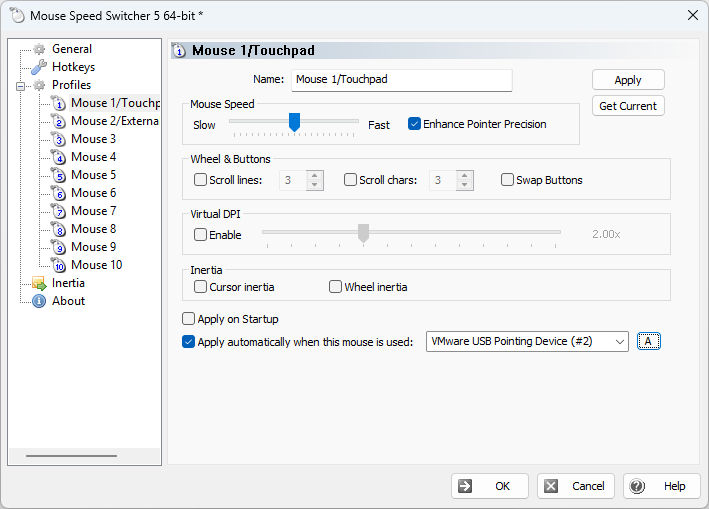
Mouse Speed Switcher is a Windows utility that lets you quickly switch between different mouse speed, acceleration, scroll and button configurations. Store up to 10 profiles and activate them through the system tray menu, global hotkeys, or automatically based on which mouse device is in use.
Whether you switch between a laptop touchpad and an external gaming mouse, use different pointer speeds for design work versus everyday browsing, or share a computer with someone who prefers different settings, Mouse Speed Switcher makes the change effortless and instant.
Features
Up to 10 Mouse Profiles
Create up to 10 fully configurable profiles, each with its own pointer speed, acceleration, scroll settings and button layout. Switch between them in an instant.
Global Hotkeys
Assign system-wide keyboard shortcuts to switch to a specific profile, cycle through profiles, or increase and decrease speed on the fly. Works even in full-screen games via Raw Input.
Automatic Per-Device Switching
Bind a profile to a specific mouse device. When you start using that mouse the correct profile is applied automatically — no manual action required.
Virtual DPI New
Go beyond the standard Windows speed limit. The Virtual DPI multiplier scales pointer movements from 1.00x up to 4.00x, giving you finer control on high-resolution displays.
Cursor & Wheel Inertia New
Enable inertia so the pointer glides smoothly after a flick, and the mouse wheel keeps scrolling briefly after you release it — just like a touchpad. Threshold, duration and friction are fully adjustable.
Dark Theme New
Experimental support for the Windows dark theme. The settings window and tray menu follow your system appearance preference, with manual override to light or dark.
Redesigned Interface New
A cleaner, more modern settings window with a tree-based navigation panel. All profile options are now organized on a single, easy-to-scan page.
System Tray Integration
Lives quietly in the notification area. Right-click for quick access to every profile, or let balloon notifications confirm each switch.
Scroll & Button Settings
Configure vertical and horizontal scroll lines per profile, and optionally swap the left and right mouse buttons for left-handed use or alternate devices.
Who Is It For?
Laptop Users
Use a slow, precise pointer speed on the touchpad and a faster speed when you plug in an external mouse. Switching happens automatically.
Gamers & Designers
Keep a high-speed gaming profile and a low-speed precision profile for graphic design. Switch with a single hotkey — even inside full-screen applications.
Shared Computers
Each user can have their own profile with preferred speed, acceleration and button layout, selectable from the tray menu without opening the Control Panel.
How It Works
Create Profiles
Open the settings from the tray icon and configure up to 10 profiles with the speed, acceleration, scroll and button options you need.
Assign Triggers
Set a global hotkey for each profile, bind profiles to specific mouse devices, or use both methods together.
Switch Instantly
Press the hotkey, pick a profile from the tray menu, or just grab a different mouse — the settings change immediately.
System Requirements
- Windows 10 or Windows 11 (32-bit and 64-bit)
- Any standard mouse, touchpad or pointing device
- Minimal disk space and memory footprint
- No .NET or additional runtime required
- Security updates for 5.x through . Security support details.
Download Mouse Speed Switcher
Try it free. No adware, no bundled software.
DownloadCompatible with Windows 10 and Windows 11 — 32-bit and 64-bit.


